Showing posts with label intervention. Show all posts

Thursday, January 14, 2021

Academic Area: Writing

What better way to start a new year than to introduce a brand new blog series! We see so many awesome examples of differentiated and multisensory academic activities when we are out in classrooms that we thought what better way to showcase all of these great ideas than to give them their very own spot here on our blog! Introducing our Academic Area!


For our very first Academic Area post, we want to share all the wonderful examples we have for writing instruction ranging from basic handwriting to supports for paragraph writing. 

Handwriting

Many of our students with autism and low-incidence disabilities struggle with fine motor skills which can make handwriting a challenge!  

The use of tracing and copying tasks is a great way to differentiate for students who need to focus efforts more on the task of writing and less on recalling spelling. 

Jamie Minnish
Prass Elementary, Kettering


Differentiated Name Writing Tasks
Renee Vaughn
Studebaker Preschool, Huber Heights

Name Writing Morning Work Mats
Darlene Hays & Andy Krickenbarger
Anthony Wayne Preschool, Darke County ESC

Since many learners with autism are very visual learners, they can easily copy how a letter or word looks visually, however they may not use the correct letter formation. It is important to provide consistent, direct instruction of letter formation to prevent any poor handwriting habits. Use of systematic, multisensory handwriting curriculums such as Fundations or Handwriting without Tears are a great support for students who need this direct instruction. 

Fundations Visual Cues
Heather Balkcom
Springcreek Primary, Piqua

Handwriting Without Tears
Tracey Cooper
Tecumseh Elementary, Tecumseh


At times a student's needs are so significant that traditional handwriting is too difficult and a more functional accommodation needs to be made such as a name stamp.

Name Stamps
Catherine Anderson
Rushmore Elementary, Huber Heights


Sentences

There are a variety of skills that go into writing a sentence including generating a thought and putting that thought into words and then writing the sentence on paper with correct conventions. 

For students who struggle with generating a complete thought, using word cards like the examples below can be a great first step. 

Writing task of creating a sentence about a picture using color-coded picture and word cards

Writing task of creating a sentence about a picture using word cards
Laurie Maravetz
Schafer Middle School, Springfield


Once the student begins writing sentences, provide visual supports to help them self-edit their work such as writing convention rubrics or visual reminders. 

Sentence Writing Visual Reminders
Lindsay Fox Bush
Kemp Elementary, Dayton


Sentence Conventions SWAG Acryonym
Kristen Gregory
Northmoor Elementary, Northmont


Paragraph Writing

As your students develop their sentence writing skills, the next step is paragraph writing. Since writing is so challenging for our students with autism and low-incidence disabilities it is important to scaffold and adjust expectations so they can be most successful. Otherwise, writing can become a contentious and stressful time of day!

One way to motivate students to complete writing activities is to allow them to write about a special interest or favorite activity. This often increases engagement, leads to the student writing more than they typically would, and allows the staff to still see their true writing abilities. 

Special Interest Writing Journal
Lori Bicknell
Mound Elementary, Miamisburg


Graphic organizers can be helpful in supporting students to organize their thoughts and the information they want to include in their paragraph. For some students, the student may dictate while staff writes on the graphic organizer to reduce writing fatigue. 

Topic-Specific Word Wall Graphic Organizer
Kim Hampton
Broadway Elementary, Tipp City

In addition to graphic organizers, provide visual resources for students to use while writing to assist with remembering letter formation or spelling so they can focus on getting their thoughts on paper.

Writing Resource Folder
Lori Bicknell
Mound Elementary, Miamisburg

For some students, the idea of writing a paragraph can be overwhelming because they are unable to visualize what the completed assignment will look like. Providing clear expectations and an exemplar can be a great way to help them better understand what to do. 
Writing Exemplars
Monica Klarer
Indian Valley Intermediate, Greenon

Writing Exemplars
Lindsay Fox Bush
Kemp Elementary, Dayton


Assistive Technology 

When prioritizing writing expectations, you may find that the main goal is for the student to convey what they know about a specific topic rather than demonstrate the physical ability to write. Using a scribe or assistive technology such as typing, voice-to-text, or word prediction software can be a great support for students who struggle with mastering handwriting but still have a lot to say! 


Clicker Writer Word Processing Software
Karyn Smith
Tri-Village High School, Tri-Village

For more ideas on assisting students with autism and low-incidence disabilities during writing instruction we love I Hate to Write: Tips for Helping Students with Autism Spectrum and Related Disorders Increase Achievement, Meet Academic Standards, and Become Happy, Successful Writers by Cheryl Boucher and Kathy Oehler which is full of practical ideas and graphic organizers targeting specific writing challenges. 


Tuesday, December 8, 2020

Super Star Schedules: Schedule-Based Reinforcement Plans

Some of our referral students have targeted behavior goals that they work on each day. We find great success when these goals are clearly communicated and then reinforced consistently throughout the day so that the student knows exactly what is expected and exactly what is earned as a result of meeting their goals. A Schedule-Based Reinforcement Plan is a great way to present these expectations, provide a structured visual support, deliver reinforcement, and track progress. Today's Super Star Schedules provides ideas for Schedule-Based Reinforcement Plans that can work for students at various age levels. 

For younger students, targeting a single goal is a great place to start. Some students will be reinforced by a simple smiley face, star, or sticker on their chart. 

Picture Schedule with Sticker Reward System

Smiley Reinforcement Chart
Debi Gnau
Mad River Early Childhood Center, Mad River

Interactive Schedule with Token Economy
Amanda Naylor
Helke Elementary, Vandalia


While others may benefit from a break to do a special activity or get a tangible reinforcer after earning a designated number of positive marks. 
Picture Schedule with Stars to Earn Breaks
Mary Nolan & Shanon Vance
Valley Forge Elementary, Huber Heights


Smiley Face Behavior Schedule
Beth Young
Snyder Park Elementary, Springfield

The Autism Helper


Smiley Face Behavior Schedule
Jessie Henry
Tri-Village Elementary, Tri-Village

Coin Earning Schedule Path
Sandy Beck & Bethany Czapor
Broadway Elementary, Tipp City


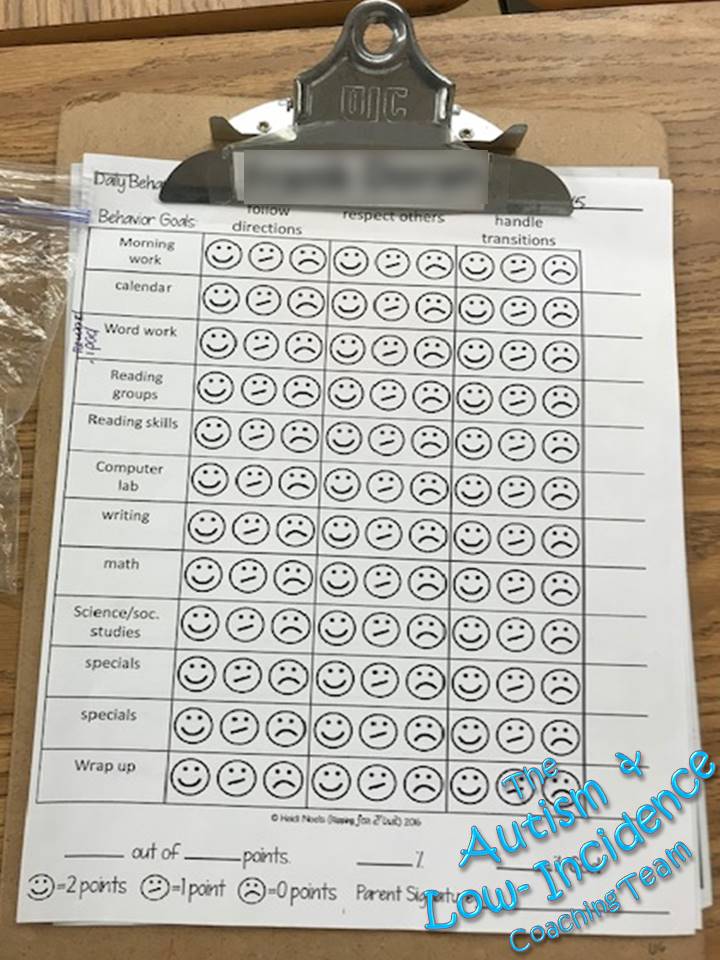
As the student masters a single focus area, they may be ready to focus on multiple goals. Often this can be communicated using multiple columns on their schedule for each goal area. 
Two-Column Behavior Schedule


Three-Column Smiley Face Behavior Schedule
Leslie Mann
Demmitt Elementary, Vandalia

Older students often use a Point System or Check-In/Check-Out (CICO) System. 
Schedule Point System with Smiley Faces
Heather Balkcom
Springcreek Primary, Piqua


Weekly Period Point Sheet
Korie Jacobs
Mad River Middle School, Mad River


For more great examples of reinforcement systems, check out our previous posts:


Friday, May 8, 2020

Remote Learning Tips and Tricks: Top 5 Tips for Using Team Collaboration to Reduce Parent Stress During Remote Learning

Remote learning requires a great deal of coordinating for families and educational teams. For our students with intensive needs, parents are managing emails, video/phone calls, and assignments from their child’s teachers as well as their related service providers (i.e. OT, SLP, VI, PT, etc). This can lead to a lot of stress!  Today’s Remote Learning Tips and Tricks will provide ideas to reduce parent stress during this challenging time. 


Tip 1: Identify a Point Person
Identify a point person who will communicate directly with the parent. This person can help with fielding questions or concerns, coordinating virtual meetings, and communicating assignment expectations. 


Tip 2: Plan Cross-Disciplinary Activities
Review the student’s IEP goals and collaborate with team members to identify activities that can address multiple goals. Click the image below to access our free handout with ideas for activities which incorporate sensory, communication, and educational/daily living skills. 


Tip 3: Co-Treat
To reduce the number of virtual meetings for a student, consider co-treating with another member of the team. Use the cross-disciplinary activities handout above to find common assignments that can be completed during these sessions. 


Tip 4: Provide Assignments in a Centralized Location
Many of our parents have reported that it is easiest when all of their child’s assignments are in one place. Some districts are using Google Classroom and all of the assignments across disciplines are saved in the same classroom. Some teachers have taken this a step further and created a Google Slide deck like the one below which outlines the student’s schedule and corresponding assignments. Click the images below to purchase this Google Deck.


Tip 5: Provide Options
The world of remote learning allows many opportunities for providing options. Allow parents to choose the mode of learning (packets/hands-on activities vs. virtual). Also, provide flexibility of when assignments are due.


One of the key areas to allow options is when scheduling virtual meetings. Sometimes it can be hard for the parent to make an assigned time work because they have their own work obligations, maybe the child’s schedule is “off”, or perhaps a sibling needs to access technology at that time. Providing the parent with options can make it easier for them to follow through. Let them choose if they want to meet individually with the teacher and related service providers or if they prefer co-treating, allow them to choose how frequently they will meet, and allow them to choose their own time slots. During our recent remote learning panel, one of our panelists shared how Sign Up Genius has increased the success of her virtual meetings. Click the image below to learn more. 


For additional tips and tricks during remote learning check out our previous posts:


Monday, April 6, 2020

Remote Learning Tips & Tricks: 5 Step Plan for Remote Learning


We know that all of our teams are faced with the challenge of facilitating remote learning during the COVID19 closures. This is an overwhelming obstacle for everyone! Keep in mind that there is no right or wrong way to handle this challenge. It is new for everyone involved so be kind to yourselves! To help you get started, we will be sharing some Remote Learning Tips & Tricks this month. Today we will focus on getting started. 


Although the teaching format may be new, this doesn't mean you need to bombard parents, students, or yourselves with a ton of new expectations. Use familiar lesson plans (although shorter in most cases), learning materials, and visual supports and follow our 5 Step Plan:

Step 1: Set Up
Step 2: Conduct Virtual Meeting
Step 3: Assign Assignments
Step 4: Follow Up
Step 5: Reflect


Step 1: Set Up
  • Set up your work space: A good work space is free from visual and auditory distractions. You will be spending a lot of time sitting and using your computer so make sure you are comfortable! 
  • Set up your technology: You will need a computer/laptop. If you plan on live video conferencing you will need a webcam and internet connection. Determine a web conferencing platform. Zoom is currently offering free memberships or if you use Google Classroom you can use Google Meet. Familiarize yourself with how to add students, mute participants, and share your screen if you plan on presenting information. 
  • Create a schedule: Establishing a schedule is an effective way to reduce feeling overwhelmed. Determine when you will communicate with families, collaborate with colleagues, plan lessons, and provide direct instruction either individually or in groups. Make time to research new resources and professional development. 
  • Create a lesson plan: It is important to still plan your lessons. During remote learning, lessons should be shorter to keep students engaged and focused. 
  • Prep materials: Prepare any materials you will need during your lessons as well as any materials that will need to be sent home for students (i.e. work packets, file folder activities, taskboxes, etc). Make sure they are readily accessible to minimize distractions. Include visual supports such as reinforcement systems and visual countdowns. Click the images below for our free visual support templates, video models, and handouts. 

Visual Contract Reinforcement System

Visual Contract To Do List Reinforcement System

Visual Countdown

  • Communicate with families: It is more important now than ever to have good communication with your student families. Provide them with your schedule for virtual meetings, explain how you will be assigning assignments, and the best way for them to contact you if they need help. There are a variety of options that you can use including Remind, Class Dojo, or Google Classroom. If you are concerned about sharing your personal phone information, you can use Google Voice to set up a free phone number that can be used for making calls and text messaging.
  • Provide priming tools for families: Social distancing and remote learning are huge changes for your students. Consider what priming tools they may need such as social stories or visual tools to help this transition go smoothly. If there are visual tools you are currently using in your classroom, provide those same tools to your families to increase consistency and familiarity. Click the image below to access our free visual tool templates, handouts, and videos to share with your families. 
ACT Remote Learning Tools Google Folder
  • Record videos: If you want to use the same content multiple times, record it! This is a great option for students who need multiple repetitions of content, families who have limited internet access, or when you have limited time to continually do live virtual meetings. Some great content to video could be morning meeting, calendar, or read-alouds. Consider videoing content that you would want to access in the future. Read-alouds could be used at your classroom listening center. You can also create videos for assignment instructions, use of visual tools, and modeling instructional methods. Not only would these videos help students and families now but they can be used during paraprofessional training in the future. Click the image below to access videos of our visual tools and sensory supports you can share with families:


Step 2: Conducting Virtual Meetings
  • Send a reminder: Don't forget to remind families when you will be going live. 
  • Make personal connections: Make sure to take time to connect with your students. They miss you and the normalcy of their typical school schedule! Allow time to ask questions and see how they are doing. If you are conducting virtual group sessions, be sure to give student time to interact with one another. If this is all you accomplish the first few sessions that is okay! Students are still getting used to the new format and you are learning how to navigate and manage remote learning. 
  • Set Expectations: As you begin conducting lessons, use visuals to set expectations. We love our simple mini-schedule which can be used to preview what you will be covering during the virtual meeting and is a great tool you can use in the classroom as well. Click the image below for our free template and a handout with more information. 


  • Build routine and familiarity- To start, use familiar routines and content that students have mastered in the classroom such as morning meeting, read-alouds, or call and response activities. You can even use screen presentation tools to share online calendar activities (such as Starfall or News2You) or songs on YouTube. 
  • Slowly add new content: Go slow! Once your student (and you!) have a handle on remote learning, begin teaching new content. Consider sending home interactive learning tools for students to engage with while you are instructing such as an interactive calendar book, word building mats, or graphic organizers. 


Step 3: Assign Assignments
  • Independent practice: Assign tasks that students can do independently between virtual meetings to practice their skills. Start with familiar assignments that the students have done in the classroom such as taskboxes or repetitive paper-pencil tasks. Differentiate these assignments not only on student needs but based on their student's ability to access the internet. You may need to consider options that can be printed and sent home for students. 
  • Provide explicit instructions: Although your students may be familiar with some of the tasks assigned during remote learning, often students with autism or low-incidence disabilities struggle to generalize skills they have learned in the classroom. Provide students and parents with explicit instructions on what is expected with the assignment. Communicate with parents to provide coaching, send home a video model, or use screencasting to demonstrate. 
  • Consider online assignments: Some online platforms allow you to assign tasks that students can do remotely and you can check  later including Unique Learning System, SMART Learning Suite, or Google Classroom.  Click the image below to access our Google activities that can be assigned to students. 
  • Think ahead: Don’t overdo it with creating materials you will never use again. Consider what activities you would be interested in incorporating into the classroom in the future. 


Step 4: Follow Up
  • Follow up regarding virtual meetings: After a virtual meeting, send an email to families with next steps, assignment reminders, and deadlines. It is easy for everyone to forget what is expected during these unprecedented times. 
  • Give ideas for supplemental activities: For some families, keeping their child entertained throughout the day can be really difficult. Provide practical ideas for families to engage their child with such as cooking activities, games, sensory activities, or daily living routines. Share fun websites or apps for read-alouds or academic practice. This will help parents stay sane and hopefully will keep students from spending all day on YouTube! We love the free activity guide and choice boards for families below (click the images to access). 


Step 5: Reflect
  • Get feedback from families: Check-in to see how things are going and periodically survey parents to get their feedback regarding remote learning. You can easily set up a free survey through Google Forms that can be sent to families through email or text. 
  • Document everything!: Keep track of lessons, assignments, and attempts to contact families. Also determine how you will monitor student progress towards learning objectives and IEP goals. Use work samples or assess students individually during virtual meetings. Consider asking parents to video students completing tasks. 
  • Rinse and repeat: Reflect on your data and parent feedback when planning for your future virtual meetings and assignments. 
  • Don't forget self-care: As you reflect, take time to check in with yourself. Determine what areas you feel are going well and what you need more support with. Reach out to your colleagues and don't hesitate to contact the Autism & Low-Incidence Coaching Team if you want our support. We are always happy to help! Most importantly, be kind to yourself! 

Monday, January 13, 2020

Organization Station- Learning Center Rotations

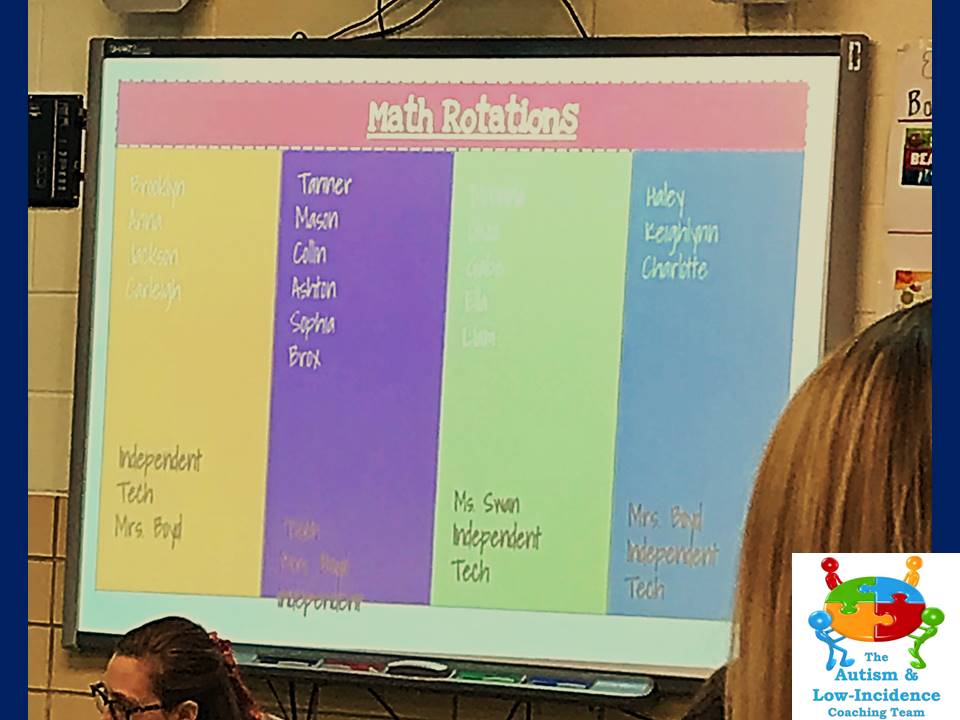
When coaching teams we often encounter teachers who are struggling to meet the diverse needs of their students are various academic levels. Often, we recommend implementing learning center rotations for part of the school day so that teachers can plan differentiated instruction for small groups of students to ensure individualized needs are met. An added benefit of small group instruction during learning center rotations is higher engagement in learning and frequently it makes managing behaviors more effective and less disruptive. Today's Organization Station provides some of our favorite examples from across the Miami Valley. 


Effective implementation of learning center rotations requires planning. For ideas on planning for staff and students check out our previous post on Scheduling Center Rotations.

Once a plan has been determined, provide students with visual supports to help with knowing where they need to go. For some students, a basic list of centers and labeled locations provides enough information for them to transition successfully.


Janel Speelman
Preble County ESC Alternative School

Shanon Vance
Valley Forge Elementary, Huber Heights

Laura Boyd
Valley View Elementary, Valley View

Kleptz ELC

Some teachers make interactive displays so that student groups and locations can be changed each day. 

Mandy Guilmain
Stevenson Elementary, Mad River
We love how the example below shows the general class rotation schedule and also a mini-schedule for a student who needed more individualize support to help with transitioning to the correct location.

Pam Locker
Washington Primary, Piqua
When a group of students need assistance with transitioning during rotations, implementing a location-based schedule can be beneficial. A location-based schedule requires students to take an icon (such as the colored shapes or colored name strips shown below) and match it to the designated location during the transition. 

Jackie Vollmer
Driscoll Elementary, Centerville 
Robbie Whorton
Demmitt Elementary, Vandalia


For more great examples of ways to organize learning center rotations check out our previous post: