We are so excited to see how many schools are prioritizing their student's sensory needs by providing a calming sensory space for students to use proactively to maintain regulation and when they are feeling overstimulated. Often it can be difficult to dedicate an entire classroom to creating a calming room so teams get creative with using storage space, closets, offices or divided rooms. Today's Regulation Rendezvous is dedicated to all the creative spaces we have seen for Mini Calming Sensory Rooms.
Parkwood Elementary, Beavercreek
We love how this space is located at the end of a hallway so it is not surrounded by a lot of extra school stimuli. The name "Cozy Cove" is great and sets the ton for a calming space. This space not only provides a place for students to go for breaks that are scheduled and as needed but also houses additional supports such as weighted vests and visual timers that can be used to support students in other environments.
Angela Crum
Beavertown Elementary, Kettering
What a great space! We love the dimmed lighting using curtains, bubble tubes, and lamps. The floor is cushioned with additional rugs and students have seating options such as a rocker or beanbag. A radio is also available for calming music.
Smith Middle School, Vandalia
Using mats to cover the walls helps to limit auditory clutter from surrounding classrooms. There are lots of comfy seating options and when the lights are out students can turn on a nice, relaxing light show projector.
Jennifer McGowan
Helke Elementary, Vandalia
Wall padding is used in this room to help with auditory clutter and to keep students safe on the swing. We love how they have created a two-point suspension system for the swing to promote calming, linear movement when swinging. The tent is also a great small space for students who crave additonal boundaries within the small space.
If you are looking at creating a larger space, we have featured several rooms that also offer some wonderful examples:
Today's Communication Corner is continuing our quest to provide
teams with strategies for teaching functional communication skills and focusing
on the function of protesting.
Our students may have a variety of reasons to protest. They may
protest changes to their routines or schedule. Their protest could be
communicating that they don't want something that has been offered. For some
students it is important to protest when sensory stimuli is too overwhelming.
There are a variety of reasons, which leads to a variety of strategies.
Teaching "No"
It is important for us to teach the word "no" in a
functional way. Our students need to be able to self-advocate when there is
something they don't want. Teaching them to better express their wants and
needs can prevent them from being taken advantage of as they get older.
Initially, you will want to teach "no" in a very
concrete way that has meaning. Often this can be done with tangible items such
as asking them if they want an offered item or food. Don't propose questions
that may be confusing or abstract for the students or may not have much meaning
to them such as "Is the sky purple?" Also, be mindful once you start
teaching "no" and avoid phrasing directions as questions when the
student doesn't really have a choice. For instance, don't say "Do you want
to work?" instead say, "It is time to work".
Use visuals to help students understand when it is time to respond
with a "yes" or a "no". These visuals can also decrease
echolalia when asking yes/no questions.
Kirsten Johnson
Greene INC
Once the student understands the function of saying "no"
you can work on generalizing to more abstract concepts. Additionally, you will
need to teach the boundaries to saying no because sometimes there may not be a
choice. This skill is taught later because you first want the student to
understand the power of using the word "no" versus more unexpected
behaviors.
Teaching "Stop"
The word "stop" can also be used to teach protest. It is
a very functional way to tell others when you no longer want something to occur
and can also be an important safety skill. As with most functional
communication skills, you will want to start teaching "stop" in a
concrete way such as with stop and go games or with specific actions.
Being able to say "stop" is also great for providing
feedback during sensory activities. A student may want to stop swinging or
jumping on a trampoline. They may also want to ask staff to stop when brushing
or giving compressions. This would be a great alternative to using behaviors or
pulling away unexpectedly.
Teach Descriptive Language
Consider teaching your students other ways they can give important
feedback such as "too loud" or "too hot". This descriptive
language can provide staff with more information about what may be bothering
students.
Visual supports are great for giving students options and
communicating to them what appropriate responses may be in a given situation.
As various words and phrases are taught, add them to a visual for students. We
love how ALIST teacher, Rebecca Lemons, has a poster available for her students
to reference with a variety of taught protest options including "please
stop", "no thank you", "I don't want to", and
"leave me alone please". This is a great way to support an expanding
vocabulary. Smaller versions of this visual could also be provided to individual
students so that it is readily available when needed.
Don’t be afraid to teach your students how to
protest. If you don’t teach them an
expected way to protest, they will most certainly find some unexpected ways to
tell you NO.
Taskboxes are a popular instructional tool that we see in many of the classrooms we coach. They are an engaging way to provide hands-on skill practice. However, since taskboxes often have a variety of pieces and can be large to store, organization can be a challenge. Today we are doing an Organization Station and Taskbox Time mash-up to highlight some of the creative taskbox organization strategies we have seen.
Organization often depends on the type of tasks used and the space provided for storage. For students who primarily work on worksheet tasks, a pocket organizer can be used to organize and label worksheets.
Wooden cubbies are great for providing individual slots for each task whether you are using taskboxes or file folders.
Robbie Whorton
Trotwood-Madison High School, Trotwood
When open storage is not in use, we suggest covering it to reduce visual clutter.
Taylor Ruef
Stevenson Elementary, Mad River
When organizing taskboxes it is helpful to have a labeling system. Some teams use symbols to label their taskboxes including Ellison cut outs, Boardmaker symbols, or other picture icons.
Jamie Zimmer
Kettering Middle School, Kettering
Brittany Sword
Valley Elementary, Beavercreek
Marissa Calhoun
Fairbrook Elementary, Beavercreek
Another common labeling system is numbers. In this first example, the teacher uses the same 12 bins and switches out tasks each week. This is a great space saver!
Kate Tipple
Helke Elementary, Vandalia
This classroom numbers their taskboxes 1-5 to make deciding on the order of presenting tasks to students easier.
Kelly Krause
Horace Mann Elementary, Springfield
Other teams decide to take pictures of the actual task to use for the label. This helps quickly identify what is task is in the box and provides a visual of what the task should look like when set up.
Carrie Prickett
Jane Chance Elementary, Miamisburg
These pictures incorporate color-coding to give additional information about the type of task and make sorting easier.
Angie Kleinhans
Stebbins High School, Mad River
Here are some additional examples of color-coding to help with task organization.
Jamie Minnish
Prass Elementary, Kettering
Once a labeling system is put into place, many teams use the labels when assigning which tasks students should complete. In this system, they use symbols, letters, and numbers to label taskboxes and then present the assigned tasks to students either through a To Do-Finished format or First-Then board.
Lindsey Woods
Fairborn Primary, Fairborn
This team divides students into two groups based on common goals/ability levels and then the assignment is given to each group. Classroom staff sets up the assigned taskboxes using the visual reminder.
Beth Young
Snyder Park Elementary, Springfield
When assigning work, these classrooms use picture symbols which correspond with the taskbox labels and place the symbols on the student's work strip schedule.
Brittany Sword
Valley Elementary, Beavercreek
Marissa Calhoun
Fairbrook Elementary, Beavercreek
Emily Ottmar
Stevenson Elementary, Mad River
For more information on using taskboxes and structured work systems check out our other blog posts:
We have found that "down" time can be extremely challenging for our referral students. They often struggle with how to fill the time appropriately and too much unstructured time can sometimes lead to increased anxiety and/or behavior issues.
In today's Around Town Round Up, we will provide some ideas for anchor activities (Tomlinson, 2001) that can be used throughout the day to provide additional structure during otherwise unstructured times.
What are anchor activities?
Anchor activities are specified ongoing activities on which
students work independently which may include ongoing assignments that students can work
on throughout a unit or previously determined activities the student has mastered or enjoys doing.
Why use anchor activities?
provide a strategy for teachers to deal with “ragged time” when students
complete work at different times
they allow
the teacher to work with individual students or groups
provides
ongoing activities that relate to the content of the unit or IEP goals
allow the
teacher to develop independent group work strategies
When can you use anchor activities?
at the
beginning of the day
when other
assigned work is completed
at times
when there is unanticipated “down” time
at the end
of the day before going home
while
waiting for assistance from the teacher
Examples:
Having individual student book bins provides students with books that they can read independently.
Kim Hampton
Broadway Elementary, Tipp City
This "Construction Zone" is an area of the classroom where students can place unfinished assignments to work on later.
Heather Balkcom
Springcreek Primary, Piqua
When waiting during transitions, students in Rachel Hatton's class wait in their individual chairs and can read books or play with fidgets provided under their waiting chair.
Rachel Hatton
Normandy Elementary, Centerville
These students have individual clipboards of unfinished work to complete as an anchor activity.
Alexa Willis
Snyder Park Elementary, Springfield
These fine motor bins are an fun activity for students to work on each morning. The assigned bin rotates regularly to keep kids engaged.
Kathy Timmerman
Fairbrook Elementary, Beavercreek
This "Finished Choice" bin has reinforcing activities for students to work on if they finish early. It is portable and provides quick clean-up for transitions.
Taylor Ruef
Stevenson Elementary, Mad River
Similar to the two examples above, these early finishers tasks provide a variety of fun activities for students.
Executive Functioning deficits can impact individuals
with Autism and a variety of other disabilities including but not limited to
Attention Deficit Disorder, ADHD, Intellectual Disabilities, Specific Learning
Disabilities, Traumatic Brain Injuries, and Anxiety Disorders. Difficulty with
executive functioning can occur at any ability level. This can often be
frustrating and confusing when working with students who are academically
bright or gifted because they still lack skills essential to success. Directly
teaching strategies and skills to address executive functioning skills is vital
to supporting these students and is an important step in preventing them from
becoming overwhelmed with the various demands throughout their day.
Executive Functioning deficits can impact these six
areas:
1.Planning
and Organization
2.Attention
and Impulse Control
3.Memory
4.Emotional
Regulation
5.Flexibility
6.Problem
Solving
Because Executive Functioning is so important and we see so many of our referral students struggling in these areas we are launching a brand new blog series dedicated to providing strategies for addressing these deficits. Introducing the Executive Function Forum!
Our first installment will be dedicated to strategies for directly teaching planning and organization skills. Individuals who struggle with planning and organization
often have difficulty with keeping track of their materials and assignments. They
may struggle with processing speed. This deficit can also impact school
performance because the individual may have difficulty with reading
comprehension and event sequencing, note taking, writing coherent sentences or
paragraphs, or solving multi-step equations or word problems. This may also
impact their ability to organize their free time.
Here are some great strategies for supporting students
who need help with planning and organization:
Supply Organization Visuals
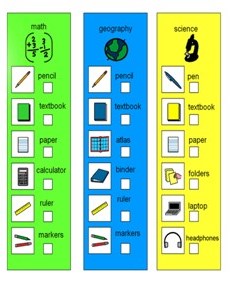
Physical organization of materials and supplies can be a big challenge for our students which can make remembering what materials are needed for a specific subject or assignment more difficult and often leads to time wasted looking for supplies.
Annette Stine
Kyle Elementary, Troy
30 Second Rule
Provide students with 30 seconds of wait time for responding and following directions. This provides time to process what has been said and plan for what to do next. This is especially important for students who also have auditory processing deficits or difficulty with auditory stimulation.
Color Coded Supports
Color coding can provide a visual cue to help students categorize information for retention and for later retrieval. A great support is the use of color coded lists for organizing materials for different subjects.
Color coding can also be used when organizing new concepts or vocabulary words.
Additionally, many AAC programs use color coding to organize vocabulary within the program.
Graphic Organizers
Graphic Organizers help students with organizing their thoughts and planning for written assignments.
Kim Hampton
Broadway Elementary, Tipp City
One of our favorite resources for graphic organizers is I Hate to Write. Click on the image for more information.
Work Organization Systems
Task completion can be made easier with the use of a work organization system which lets the student know exactly what work needs to be done.
Traci Parker
Forest Elementary, Troy
Vicki Gomes
Miami East Intermediate, Miami East
Laurie Maravetz
Schaefer Middle School, Springfield
Bobbi Jo Chapman
Snyder Park Elementary, Springfield
Work Plan Template
For some students, a more advanced system can be used to organize assignments so they know what they are expected to complete. Individual organizers or class-wide templates can be used.
Emily Ottmar
Stevenson Elementary, Mad River
Robbie Whorton
Trotwood Madison High School, Trotwood
Agendas
For homework assignments, an agenda is an excellent support for planning what needs to be done at home. We love this example because it provides additional reminders for upcoming tests or projects and has a space for marking what needs to be taken home to complete the assigned homework.
Free Time Choice Boards
Many of our referral students struggle with planning for leisure or down times so having a choice board for what activities are appropriate during this time can be an effective support.
Emily Ottmar
Stevenson Elementary, Mad River
Leslie Mann
Smith Middle School, Vandalia
For older students, multi-step projects and assignments can be increasingly difficult to organize and plan for. Often, students need supports for planning the steps required to complete the assignment as well as supports for organizing the time needed to complete each step. The supports below may benefit these students:
Task Analysis for Projects
For some students, staff may provide a task analysis for the student to complete in the order provided.
Eventually, students need to develop the skill of performing their own task analysis to determine what steps need to be completed. We love the resources below which can be accessed through clicking on each image.
Using the ladder, the student can set a goal (finished assignment) and then use the rungs of the ladder to write each step needed to complete the final product.
Teaching Kids to Thrive
Debbie Silver & Dedra Stafford
Project Mapping uses post-it notes, a calendar, and a graphic organizer to break a project into steps, assign a due date, and visually map out if the step needs to be started, has been started, or is completed. The video below does a great job illustrating this process.
FLIPP The Switch
Sheri Wilkins & Carol Burmeister
Gantt Chart
Gantt Charts are an excellent time management tool. They visually organize the time needed to complete the steps of an assignments or multiple assignments.
More information can be found in this video:
When first teaching time management, a great tool to use is this Time Manager worksheet where students can write tasks and compare estimated times needed to complete with actual times. Click on the image to be redirected to the site.
Teaching Kids to Thrive Debbie Silver & Dedra Stafford