Often we hear from teams that managing individual visual schedule can be overwhelming to keep track of. This is increasingly challenging when classrooms have higher numbers of students, more complex student needs, and reduced staffing. Despite these challenges, our teams know that a visual schedule can be essential to smooth transitions and priming to reduce anxiety throughout the day so we have seen some creative group schedules which can often be a more manageable solution. Today's Super Star Schedules post will highlight some of our favorite examples of group schedules throughout our districts.
Interactive Group Schedules
For some students, the tactile support of interacting with the schedule is important to them understanding the sequence of the daily activities. It can reduce escape behaviors because the student sees the activities being completed and they are visually removed from the schedule.
Pocket charts can be an easy way to create an interactive schedule. The visuals are placed in the chart and either removed or turned around when finished.
Genevieve Harvey West Carrollton ECC
Granville Bastin Preble County ESC
Rhonda Brunk Trotwood ELC
Rene Naas Tipp City Middle School, Miami County ESC
Taylor Lawson Louise Troy Elementary, Dayton
Using magnetic tape or velcro to attach the schedule to the board and then removing the visuals as they are completed is another option.
Jessica Hartman Northmoor Elementary, Northmont
Lisa Mossing Beverly Gardens Elementary, Mad River
Casey Morter Mad River ECC
Makayla Barber Mad River ECC
Casey Morter Mad River ECC
Projected Schedules
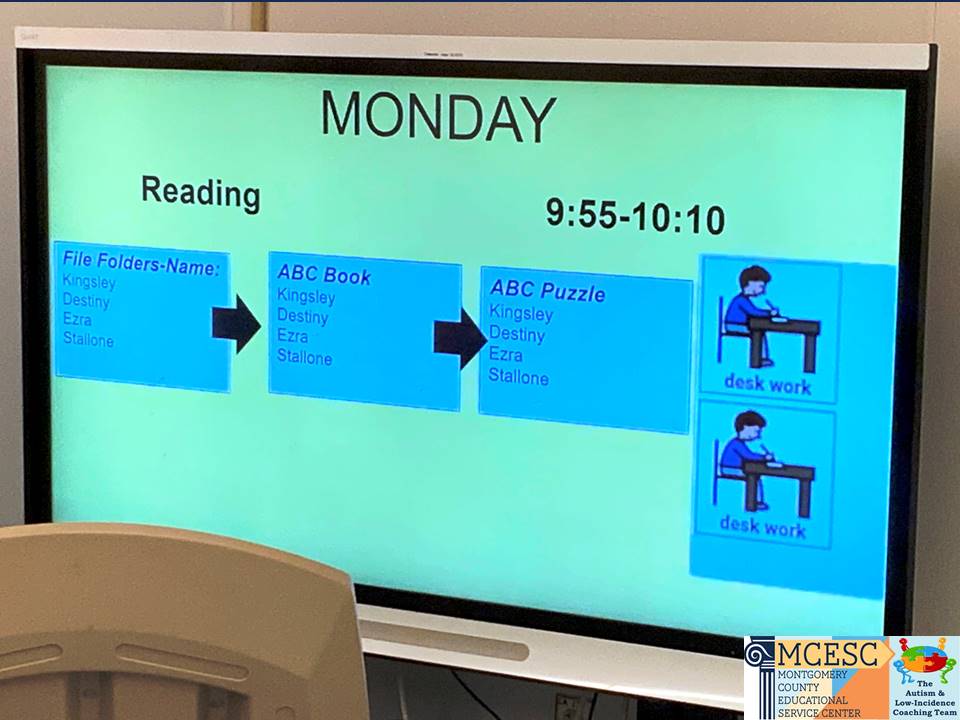
Another type of group schedule we have been seeing more and more frequently is a projected schedule using Google Slides. Benefits of a slide schedule are they can be quickly modified, don't require printing and laminating, and can still be interactive in edit mode.
Traci Gasho Madison Park Elementary, Trotwood
MaKynzie Lowery Learning Center- West, Montgomery County ESC
Paige Leary Kemp Elementary, Dayton
A document camera can also be used to project a schedule for the whole group. We love how this teacher included the visual timer and had a great Brain Break visual!
Deanna Granroth Wogaman Middle School, Dayton
Written Schedules
For some of our older classes, a written schedule works well.
Robin Koronich Learning Center- West, Montgomery County ESC
Rebecka Stricker Springcreek Primary, Piqua
Often we see time supports incorporated either through including the period and/or the actual transition times. This is great for developing those functional life skills!
Paige Leary Kemp Elementary, Dayton
Bev Richardson Bruce Elementary, Eaton
If all of the students can read with comprehension, a written list can be used, however for students who are still developing their comprehension skills, picture supports can be used as well.
Emily Baker Northwestern Middle School
Vince Lintner Miamisburg High School
Robin Koronich Learning Center- West, Montgomery County ESC
Do you use group schedules in your classroom? Have any of these examples inspired you to try them or make some changes to your current schedules? For more examples, check out our previous posts:
We have featured individual schedules before, however there is never a shortage of creative ideas in the classrooms we coach when it comes to creating these schedules from increasing portability and interaction to including special interests. Today we will feature some more of our favorites we have seen recently around the Miami Valley.
Interactive Schedules
Our first set of examples are some traditional interactive visual schedules with moveable icons that students can remove as each activity is completed.
Interactive Schedule with extra pieces Emily Beck Bradford Elementary, Bradford
Interactive Schedule with finished pocket Rachel Engle Horace Mann Elementary, Springfield
Interctive Symbolstix Schedule Allie Clements Schnell Elementary, West Carrollton
Interactive Schedule Strip with extra pieces Dustin Krouse Horace Mann Elementary, Springfield
Interactive Variations
These examples include some variations to make them more interactive including checking off a written schedule or using check mark manipulatives to mark finished activities.
Interactive Checks Schedule Jessie Henry Tri-Village Elementary, Tri-Village
Portability
In addition to being interactive so students connect to the schedule, for students who travel throughout the school building portability is also key. Taking the schedule from location to location allows this tool to be easily accessible and can ease anxiety while also aiding in smoother transitions.
Binder Interactive Schedule Erika Lauterbach Dixie Elementary, New Lebanon
Clipboard Interactive Schedule Jessie Henry Tri-Village Elementary, Tri-Village
It can be challenging to get student buy-in at times when introducing a visual schedule, therefore incorporating their special interests and favorite characters can be helpful. We love these creative examples!
Interactive Schedule with Dinosaur and Zombie icons Mandy Schetter Northmoor Elementary, Northmont
Blue's Clues Handy Dandy Notebook Schedule MCESC ACT Team
Reinforcement System Schedules
To get further buy-in for some students, tying their schedule into the class-wide reinforcement system can be a great way to make sure they are continually referencing their schedule throughout the day. It helps increase staff accountability as well!
Visual Schedule with Zones and Reinforcement Mary Jane Donovan Learning Center-West, MCESC
Print Schedule with Reinforcement Highlighting Julia Spencer Learning Center-West, MCESC
For more examples of schedule-based reinforcement systems don't miss the post below:
In the classroom, learning often takes place in a small or large group. This can be challenging when you have students who come to your class with very individual needs. Group learning can be very stressful for students who struggle with communication and social demands. Some students struggle to keep their bodies regulated. We all know, in a group setting, when one student is dysregulated the whole group can become dysregulated. In order for each student to participate and engage in learning, it will be important to consider the communication, social, and regulation supports below. Today's Communication Corner will provide some tips and examples for Encouraging Group Participation.
Communication Supports:
Make sure each student has a method to participate. If they use AAC, make sure their device is set up for quick and easy access. A voice output button can allow even the most challenged student a simple method to participate.
GoTalk 9+ AAC for Circle Time Mandy Whitfield MCESC-Learning Center East, MCESC
Provide pictures to allow better understanding and quick responses. Even verbal communicators will benefit from the use of pictures and visual supports.
Greene INC, Greene ESC
A Wh-Flipbook is another helpful visual support that can be used during group activities. By providing picture responses, all the students are able to respond to questions and participate in the activity. Remember, visual input is processed much more quickly and efficiently than auditory input. By providing visual supports, you are reducing the anxiety for students who struggle with language processing and expressive communication.
Different students may need different communication tools for the same activity. It is important to differentiate to help these students participate to the best of their ability!
iPad AAC with Proloquo2Go
Picture Choices
Step-By-Step AAC Switch
Social Supports:
Some students are very aware of their peers and become extremely stressed when they know others are watching them and waiting for them to respond. They may avoid participation in fear of being wrong or embarrassed with the way they respond. It is important to set students up for success. Communication supports can also be a helpful way to make sure all students have a quick and easy way to participate in social interactions.
You will also want to consider the difficulty of the task. Modify the task demands to allow student success. Students who are shy and withdrawn will need to experience easy success to begin building their confidence. Consider the use of a peer mentor to provide support during group learning. Identify a kind and helpful student who can sit next to a student who is struggling. Teach the peer mentor strategies to be helpful without causing embarrassment or adding more stress.
Students with poor social skills may engage in behavior that is disruptive to the group such as interrupting or making negative comments about the responses of others. Specific social skills will need to be directly taught and practiced in structured lessons outside the group instruction. The student will need to be primed to use those skills just prior to the group activity to facilitate success. You can also work with the whole group to create videos to model expected group behavior by catching students demonstrating target skills. Most kids love to see themselves in the video so they try hard to demonstrate the target skills.
Visit our Sensational Social Skills Blog to get ideas for teaching specific social skills that are important in a group setting:
There are many hidden demands associated with being in a group that can make students feel very dysregulated. Students may feel anxious about unexpected touch from students sitting nearby. They may feel overwhelmed about the competing and constantly shifting auditory and visual input of a group. Many students struggle with passive listening and need something to keep their bodies alert and engaged in the lesson. Some students need movement and struggle to sit still. Depending on the activity prior to group, some students may come to the group already dysregulated. Consider the following strategies to keep your group regulated and engaged:
Consider preferential seating. If a student has anxiety about unexpected touch or other sensory sensitivies, allow the student to sit away from the group. Often, we find students can learn from a group session even when sitting outside the group. In fact, they are more available for learning because they are no longer stressed or overwhelmed by the sensory input. If the student seeks movement, consider allowing the student to sit in a different type of chair that provides boundaries while allowing movement. Some students do well when allowed to stand or pace in a defined area. You can use tape on the floor to make clear boundaries for students who need to stand or pace during group instruction.
Student Home Base Ashley Fry Bradford Elementary, Bradford
Find creative ways to engage students during passive listening. Provide something to keep the students engaged in the lesson such an interactive book, prop, or a fidget item related to the topic.
Interactive Reading Group with Character Props Amy Beanblossom Arcanum Elementary, Arcanum
Interactive Reading Group with Character Puppets and Dirt to Act Out Story Deanna Hicks Hollingsworth East Elementary, Eaton
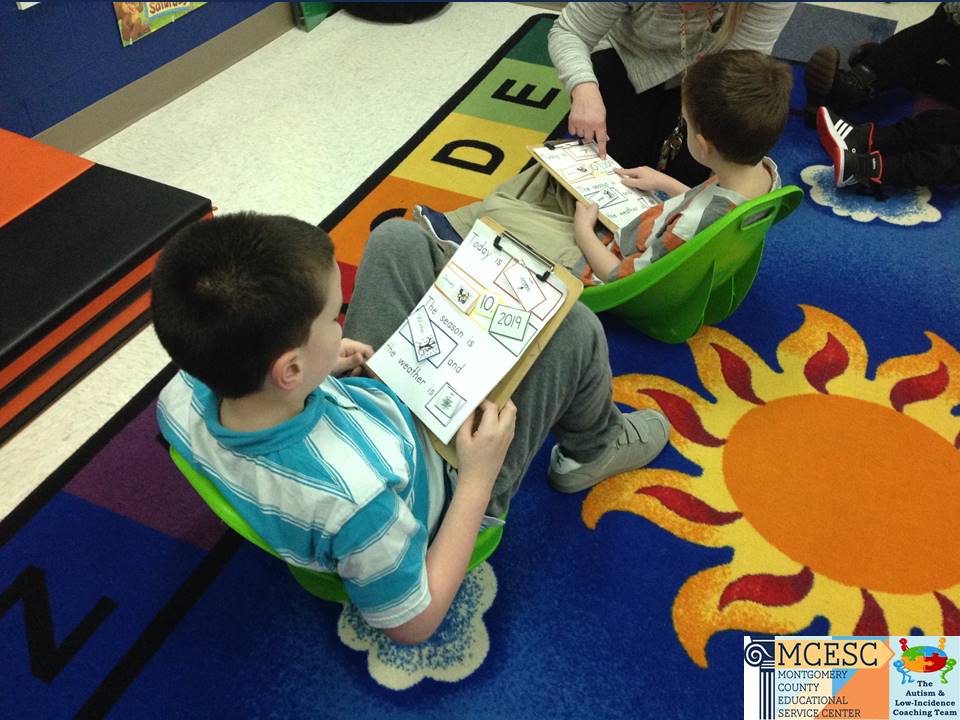
Provide students with an interactive book or clipboard related to the group discussion. Each student can have their own or you can pair students so a stronger student can model and cue a student who struggles.
Circle Time Clipboards and Adapted Seating Amy Beanblossom Arcanum Elementary, Arcanum
Here is a video of a teacher priming her new kindergarten student to use an interactive calendar book. The video and book were sent to the student’s parents over the summer to practice using the book prior to their child starting kindergarten in the fall. This would also be a good tool to send home if a student is joining the morning group virtually.
Circle Time Book
Proactively planning and implementing these supports can help all your students engage in group learning and participate with success!