
Showing posts with label high school. Show all posts

Tuesday, April 25, 2023

Super Star Schedules: Troubleshooting Common Student Schedule Concerns

Visual schedules can be an extremely effective support for students. They provide clear expectations and structure, reduce anxiety, and can help to facilitate transitions. However, at times a team may need to troubleshoot concerns that come up when implementing this tool to increase its effectiveness. Today's Super Star Schedules post will feature ideas we have seen in our districts for Troubleshooting Common Student Schedule Concerns. 


Concern #1: The student doesn't pay attention to the schedule.
It is important that the student is interacting with the schedule. If it is just posted on the wall or lost in a desk, the student may not connect with it.  Encourage the student to interact with the schedule regularly by having them move each picture into a “finished” area or put a check next to each event as it is completed.

VeraKaye Sowers
Northridge Elementary, Northridge

Dustin Krouse
Horace Mann Elementary, Springfield

Cynthia Resch
Learning Center-West, MCESC

Heidi Horner
Miami County ESC

Rachel Engle
Horace Mann, Springfield


Casey Morter
Mad River Preschool, Mad River


We have more examples of individual schedules in our previous posts:

Concern #2: The student struggles to transition.
If simply interacting with the schedule isn't enough, we often recommend implementing a location-based schedule where the student matches the card from their schedule to a visual in the corresponding location. 

Rylie Jarrett
Stevenson Elementary, Mad River

Brittany Wendling
Valley Elementary, Beavercreek


For more examples of location-based schedules check out our previous posts.
Concern #3: There is a learning barrier.
If you have worked to teach the purpose of the schedule and the student still doesn't seem interested, there could be a learning barrier. For some students, the popular picture icons may not meet their individual needs. Some may need actual photographs, others may need the pictures blown up or may need to use objects. 
Makayla Barber
Mad River Preschool, Mad River

Jamie Minnish
Prass Elementary, Kettering


For students who visual impairments, you may need to use high-contrast icons or incorporate tactile icons with braille. 

Hayward Middle School, Springfield

Carla Bryant
Miamisburg


Concern #4: Lack of Motivation
Incorporate special interests or student choice to get their buy-in and make the schedule more interesting for them. We have even had teams sit down with the student to choose their own icons to create their schedule. 
Jackie Vollmer
Driscoll Elementary, Centerville

Maggie Brackman
Northwood Elementary, Northmont


Concern #5: The student travels to many environments around the school. 
Since a schedule provides security for the student, it is important that the student can access it at all times. Therefore, students who frequently transition outside of their main classroom may benefit from a portable schedule option. 
Jolene Allen
Brantwood Elementary, Mad River

Lindsey Woods
Fairborn Primary, Fairborn

Tim Cundiff
Greenville High School, Greenville

Ashley Watson
Madison Park Elementary, Trotwood

Heather Clark
Saville Elementary, Mad River

Rose Jepson
Northridge Elementary, Northridge

Megan Logano
Clark ESC

Alicia Barnishin
Cookson Elementary, Troy/Miami County ESC


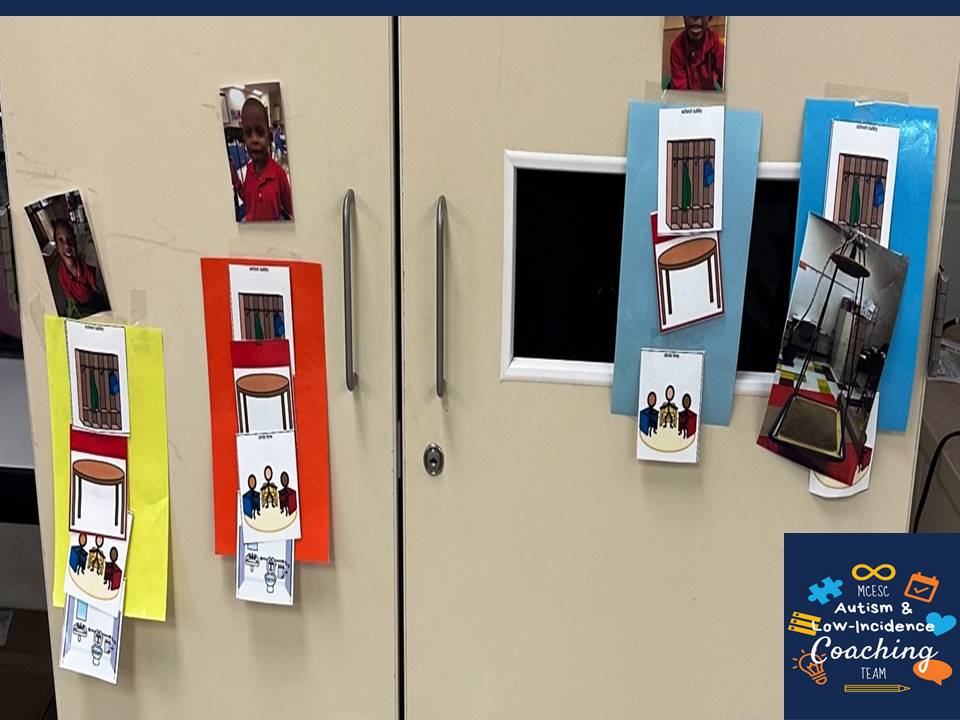
Concern #6: Each student in the classroom has a different schedule
Creating individual schedules for every student in the classroom can make transitions easier because it increases their independence and staff doesn't have to memorize everyone's schedule and provide verbal prompts. This helps when there are multiple grade-levels in one room, if students transition in and out of the classroom for inclusion, or you use centers in the classroom. 
Rhonda Brunk
Trotwood ELC, Trotwood

Lauren Dickey
Indian Riffle Elementary, Kettering

Holly Smith
Nevin Coppock Elementary, Tipp City/Miami County ESC

 
Concern #7: The student has mastered the schedule. 
Even if you feel like the student knows the routine, a visual schedule is a tool that the student can fall back on during times of confusion, anxiety, or when there are changes. Rather than getting rid of this effective support, create an individual schedule that can grow with the student. Fade visual icons and provide schedules that can easily be tucked in a binder or folder.
Nichole Dunn
Miamisburg Middle School, Miamisburg

Vince Lintner
Miamisburg High School, Miamisburg

Cassandra Hebauf
Northmoor Elementary, Northmont

For more ideas on creating schedules for older students check out our previous posts

Written Schedules

Top 3 Tips for Creating Written Schedules for Older Students

Monday, September 27, 2021

A-LIST Spotlight: John Everson- 1:1 Paraprofessional, Tipp City Schools

It is that time of year again where we get to shine our A-LIST Spotlight on area educators who go above and beyond to meet the needs of their students with autism and low-incidence disabilities. In today's A-LIST Spotlight, we are featuring amazing 1:1 paraprofessional, John Everson from Tipp High School in Tipp City. 


Our team has had the pleasure of working with John for several years as part of a student referral and we were so impressed by his dedication, patience, and willingness to collaboratively problem-solve with our team. 


While working with his student, John implemented a variety of visual supports to help the student be successful while in the school building. One of the most effective tools was a dry erase board for writing reminders and providing non-verbal prompts. This was a great, flexible support that could be used across a variety of settings and activities. 


John also worked closely with classroom staff to implement their classroom visual supports including voice volume visuals, task lists, and visual timers. Additionally, he assisted in reading the student to know when to use sensory supports such as a weighted neck wrap. 


In addition to classroom sensory supports, John implemented a variety of sensory breaks with his student over the years including sensory motor stretching, use of a sensory tent, and breaks in the calming sensory room. John is very intuitive and was able to provide valuable feedback about these supports. Additionally, he was an expert at reading his student so he knew when giving an extra 10 minute break could really help him fully relax and focus more when returning to class. 


John went above and beyond to read and analyze information we provided, trial new supports (even when they were a bit unconventional!), and take excellent data. One of the greatest strengths John demonstrated was taking all of the information provided through the coaching process and applying it to his student. This helped him with "tuning in my awareness and empathy to the correct radio frequency."


Thank you, John, for all of your hard work and perseverance over the years. We have truly enjoyed working with you!

Tuesday, September 15, 2020

Super Star Schedules: Types of Schedules

Schedules are an essential component to providing structure and predictability for staff and students within the classroom. For students with autism and low-incidence disabilities, schedules can help them learn important skills for school success including:

  • how to navigate the school environment
  • the meaning of words and symbols
  • understanding of the sequence of their day
  • increasing independence skills
As students develop their skills, schedules shouldn't be taken away but rather modified to meet the student's changing needs. When planning schedules for a student, you should consider what the student would need to remain independent and confident on their worst day. When students are feeling stressed, are struggling with executive functioning skills, or have anticipated schedule changes a familiar schedule can provide calming structure and consistency to help them get through the day. 

In today's Super Star Schedules, learn about each type of schedule and which students they work best for starting with the most basic schedule and advancing through more advanced schedule types.  


Object Schedules

Object schedules use objects to symbolize an activity during the student's day. The student takes the object to the location for the scheduled activity and either uses it to complete the activity or matches it to a designated place within the activity location. For very concrete learners or learners with visual learners, these objects should mimic their experience during that activity. For instance, when it is time to get on the bus the student may need a piece of leather to mimic the feel of the bus seat rather than a toy bus on their object schedule. 

Object schedules are a great option for students with a visual impairment who do not read Braille. They are also great for students who do not demonstrate an understanding of photos or picture symbols or have not developed their matching skills yet. 

Mitch Duncan and Tim Sullivan
Springfield High School, Springfield

In some classrooms, the object may be paired with a picture symbol to begin developing the students understanding of the picture symbol. 

Simplify the Chaos

Location-Based Schedules

When using a location-based schedule, each location within the classroom is clearly labeled with a picture icon. The student’s schedule consists of identical icon cards. When the student checks their schedule, they take off the card and match it to the label at the corresponding location. Many teams label other areas of the school environment (gym, cafeteria, etc) so the students can also use the location-based schedule to navigate outside of the classroom.

A location-based schedule works great for students who struggle with transitions because it gives them a clear expectation of what to do during the transition (match) and clearly communicates where they will transition throughout the day. Implementing class-wide location-based schedules can also be an effective classroom management system when students frequently transition to different areas at the same time. This cuts down the need for physical and verbal prompting as students are able to navigate these transitions independently using their schedules.

Jamie Minnish
Prass Elementary, Kettering


Brittany Wendling
Valley Elementary, Beavercreek


In some classrooms, the team may use a photograph of the location and the student matches the photo to the location. Another variation is the use of a designated symbol such as a color or shape for students who may not be able to understand picture symbols but are able to match.  

Sandy MacIntosh
Trotwood ELC, Trotwood-Madison

For more information on Location-Based Schedules visit our previous blog posts:

Location-Based Interactive Schedules

Steps for Implementing Location-Based Schedule


Individual Interactive Schedules

Individual interactive schedules can be individualized for a specific student’s needs. Each activity of the day can be represented by a picture symbol or word and the student interacts with the schedule in some way to show when activities are finished. Students may move the symbol to a finished location or cross off the activity.

Individual interactive schedules are a good place to start if you are unsure what level of support the student may need. The student needs to have an understanding of what the picture symbol represents. They can be used for students who do not read well enough to read a written schedule. Interacting with the schedule is essential to helping the student learn how to use the schedule as a tool and to help them with seeing the passing of time throughout the day.


Megan Kelly
Beavertown Elementary, Kettering

Interactive schedules can be made portable for student who transition frequently throughout the school environment.


Erica Lauterbach
Dixie Elementary, New Lebanon

Jessie Henry
Tri-Village Elementary, Tri-Village

For more information on Individual Interactive Schedules visit our previous blog post:

Individual Schedules

More Individual Schedules


Interactive schedules are a great way for students to see when they will be doing preferred activities such as lunch or riding the bus home. However, for some students the number of icons may be overwhelming. Consider reducing the number of icons they see at once or use a First-Then schedule to further simplify this visual support.

Amy Beanblossom
Arcanum Elementary, Arcanum

Tim Sullivan
Springfield High School, Springfield

Robbie Whorton
Demmitt Elementary, Vandalia

For more information on First-Then Schedules visit our previous blog post:

First-Then Schedules


Group Schedules

A group schedule is often displayed on a whiteboard or bulletin board within the classroom for all students to reference throughout the day.

Kelly Holmes
Greenville Middle School, Greenville

For students with good joint attention skills, a group schedule can be a sufficient visual support when used with fidelity. The schedule should be referenced at each transition and may be interactive to show students the finishing of activities. Ask your students with autism to assist in interacting with the schedule at each transition to build their joint attention and understanding of the schedule. Without this interaction, the group schedule may be visually filtered out or ignored by your students with autism because they may not see the purpose of the visual support.

Caroline Kinnison
Northmont Middle School, Northmont

Mandy Guilmain
Stevenson Elementary, Mad River


For more information on Group Schedules visit our previous blog post:

Group Schedules   


Written Schedules

Written schedules are text-based schedules that are easily accessible to the student at all times. They may be kept in a binder or folder or on their desk.

Written schedules can be used for students who are able to read and comprehend what they read. Many older students prefer written schedules because they look more neurotypical so they do not stand out. They can also be portable for students who transition frequently. Additionally, are a great support on the fly when you need something quick.

Lisa Bauer
Northmont Middle School, Northmont

Jen Everett
Springcreek Primary, Piqua

Depending on the student’s needs, written schedules can easily be modified to add a picture symbol for students with emerging reading comprehension skills. They may also be interactive through crossing off or checking finished activities for students.

Allysson Rudnicki
Tipp High School, Tipp City

Catherine Anderson
Rushmore Elementary, Huber Heights

Peggy Ristau
Brookville Intermediate, Brookville

For more information on Written Schedules visit our previous blog post:

Written Schedules           

Top 3 Tips for Creating Written Schedules for Older Students