Showing posts with label instruction. Show all posts

Tuesday, August 6, 2024

Free Pre-Recorded SpEd Hacks Webinars Available On-Demand

To kick off the year, we are featuring our pre-recorded SpEd Hacks webinars that can be viewed for free at your leisure. 

These sessions are about 75 minutes in length and focus on the following topics:
  • Classroom Layout and Environment
  • Team Building with Paraprofessionals
  • Scheduling
  • Planning for Instruction

They are a great fit for new or veteran teachers in a self-contained or cross-categorical classroom looking to get a handle on classroom organization and procedures to start the year off right!

Click the image below for access to the flyer which contains the registration links for each session. Once you register, you will be provided with the webinar recording link. 

Please note, due to the "on-demand" format of these sessions, we are unable to offer professional development hours from ACT, however many of our districts have issued their own certificates to provide CEUs to their staff for viewing our on-demand sessions. Please reach out to your district contact to coordinate this.

Feel free to share with colleagues and friends!


Tuesday, December 12, 2023

A-LIST Spotlight: Kindergarten Teacher Rose Jepson at Northridge Elementary

During our work in districts, we have met some truly exceptional educators. This is certainly the case for A-LIST Kindergarten teacher Rose Jepson at Northridge Elementary. As a general education teacher, Rose truly goes above and beyond to meet the needs of all of her students including creating specialized learning materials, visual tools, and structural supports. We often advocate that inclusion is more than just a child being placed in a general education classroom and that it involves ongoing planning and accommodations/modifications to make it meaningful. Not only does Rose already put this philosophy into practice, but she also continues to strive to do better and learn more. She has approached the coaching process with an open-mind and eagerness to learn and grow in her abilities to meet her students’ needs. Continued reflection and learning is a true sign of an excellent educator!

In today's A-LIST Spotlight, we are excited to share the whole group supports Rose has implemented as well as the individualized supports she has used as well. 


Whole Group Organizational Supports

Rose's classroom was well organized so that student materials were readily accessible. 


She used visual supports for center time transitions so that all learners knew where to transition to. The center time schedule was location-based meaning that each center had a written label and picture sign to correspond with the schedule on the board. 


Individualized Organizational Supports

Rose also organized individualized learning materials so that they were readily accessible by all staff working with a particular student. 


Additionally, she implemented a location-based matching schedule where the student would match icons for each period of the school day to the designated location sign to assist in smoother transitions. 


Whole Group Instructional Supports

With her kindergarteners, Rose implemented a variety of visual and tactile supports to engage students in various learning activities. 


She also took the time to provide direct instruction of social-emotional skills. Often we see that students struggle more and more to learn these skills implicitly so prioritizing time to teach these essential skills is so valuable!


Individualized Instructional Supports

Rose created a variety of materials for students working on different learning goals. 


Or who were working on similar learning goals but needed more individual supports to access the curriculum. In the picture below, a student has a personal set of flashcards to follow along with the whole group alphabet chant on the board each day. 


Whole Group Reinforcement Supports

Another way that Rose supports her students SEL development is through using positive reinforcement. Her students loved earning coins for expected behaviors. 


Rose also implemented a structured work system for a student who needed a predictable, concrete system of reinforcement so that they knew if they completed all three tasks, they would get to choose a break activity from their choice board. 


A very special thank you to Rose for everything she does to go above and beyond each day and for sharing these wonderful supports with us!

Monday, April 6, 2020

Remote Learning Tips & Tricks: 5 Step Plan for Remote Learning


We know that all of our teams are faced with the challenge of facilitating remote learning during the COVID19 closures. This is an overwhelming obstacle for everyone! Keep in mind that there is no right or wrong way to handle this challenge. It is new for everyone involved so be kind to yourselves! To help you get started, we will be sharing some Remote Learning Tips & Tricks this month. Today we will focus on getting started. 


Although the teaching format may be new, this doesn't mean you need to bombard parents, students, or yourselves with a ton of new expectations. Use familiar lesson plans (although shorter in most cases), learning materials, and visual supports and follow our 5 Step Plan:

Step 1: Set Up
Step 2: Conduct Virtual Meeting
Step 3: Assign Assignments
Step 4: Follow Up
Step 5: Reflect


Step 1: Set Up
  • Set up your work space: A good work space is free from visual and auditory distractions. You will be spending a lot of time sitting and using your computer so make sure you are comfortable! 
  • Set up your technology: You will need a computer/laptop. If you plan on live video conferencing you will need a webcam and internet connection. Determine a web conferencing platform. Zoom is currently offering free memberships or if you use Google Classroom you can use Google Meet. Familiarize yourself with how to add students, mute participants, and share your screen if you plan on presenting information. 
  • Create a schedule: Establishing a schedule is an effective way to reduce feeling overwhelmed. Determine when you will communicate with families, collaborate with colleagues, plan lessons, and provide direct instruction either individually or in groups. Make time to research new resources and professional development. 
  • Create a lesson plan: It is important to still plan your lessons. During remote learning, lessons should be shorter to keep students engaged and focused. 
  • Prep materials: Prepare any materials you will need during your lessons as well as any materials that will need to be sent home for students (i.e. work packets, file folder activities, taskboxes, etc). Make sure they are readily accessible to minimize distractions. Include visual supports such as reinforcement systems and visual countdowns. Click the images below for our free visual support templates, video models, and handouts. 

Visual Contract Reinforcement System

Visual Contract To Do List Reinforcement System

Visual Countdown

  • Communicate with families: It is more important now than ever to have good communication with your student families. Provide them with your schedule for virtual meetings, explain how you will be assigning assignments, and the best way for them to contact you if they need help. There are a variety of options that you can use including Remind, Class Dojo, or Google Classroom. If you are concerned about sharing your personal phone information, you can use Google Voice to set up a free phone number that can be used for making calls and text messaging.
  • Provide priming tools for families: Social distancing and remote learning are huge changes for your students. Consider what priming tools they may need such as social stories or visual tools to help this transition go smoothly. If there are visual tools you are currently using in your classroom, provide those same tools to your families to increase consistency and familiarity. Click the image below to access our free visual tool templates, handouts, and videos to share with your families. 
ACT Remote Learning Tools Google Folder
  • Record videos: If you want to use the same content multiple times, record it! This is a great option for students who need multiple repetitions of content, families who have limited internet access, or when you have limited time to continually do live virtual meetings. Some great content to video could be morning meeting, calendar, or read-alouds. Consider videoing content that you would want to access in the future. Read-alouds could be used at your classroom listening center. You can also create videos for assignment instructions, use of visual tools, and modeling instructional methods. Not only would these videos help students and families now but they can be used during paraprofessional training in the future. Click the image below to access videos of our visual tools and sensory supports you can share with families:


Step 2: Conducting Virtual Meetings
  • Send a reminder: Don't forget to remind families when you will be going live. 
  • Make personal connections: Make sure to take time to connect with your students. They miss you and the normalcy of their typical school schedule! Allow time to ask questions and see how they are doing. If you are conducting virtual group sessions, be sure to give student time to interact with one another. If this is all you accomplish the first few sessions that is okay! Students are still getting used to the new format and you are learning how to navigate and manage remote learning. 
  • Set Expectations: As you begin conducting lessons, use visuals to set expectations. We love our simple mini-schedule which can be used to preview what you will be covering during the virtual meeting and is a great tool you can use in the classroom as well. Click the image below for our free template and a handout with more information. 


  • Build routine and familiarity- To start, use familiar routines and content that students have mastered in the classroom such as morning meeting, read-alouds, or call and response activities. You can even use screen presentation tools to share online calendar activities (such as Starfall or News2You) or songs on YouTube. 
  • Slowly add new content: Go slow! Once your student (and you!) have a handle on remote learning, begin teaching new content. Consider sending home interactive learning tools for students to engage with while you are instructing such as an interactive calendar book, word building mats, or graphic organizers. 


Step 3: Assign Assignments
  • Independent practice: Assign tasks that students can do independently between virtual meetings to practice their skills. Start with familiar assignments that the students have done in the classroom such as taskboxes or repetitive paper-pencil tasks. Differentiate these assignments not only on student needs but based on their student's ability to access the internet. You may need to consider options that can be printed and sent home for students. 
  • Provide explicit instructions: Although your students may be familiar with some of the tasks assigned during remote learning, often students with autism or low-incidence disabilities struggle to generalize skills they have learned in the classroom. Provide students and parents with explicit instructions on what is expected with the assignment. Communicate with parents to provide coaching, send home a video model, or use screencasting to demonstrate. 
  • Consider online assignments: Some online platforms allow you to assign tasks that students can do remotely and you can check  later including Unique Learning System, SMART Learning Suite, or Google Classroom.  Click the image below to access our Google activities that can be assigned to students. 
  • Think ahead: Don’t overdo it with creating materials you will never use again. Consider what activities you would be interested in incorporating into the classroom in the future. 


Step 4: Follow Up
  • Follow up regarding virtual meetings: After a virtual meeting, send an email to families with next steps, assignment reminders, and deadlines. It is easy for everyone to forget what is expected during these unprecedented times. 
  • Give ideas for supplemental activities: For some families, keeping their child entertained throughout the day can be really difficult. Provide practical ideas for families to engage their child with such as cooking activities, games, sensory activities, or daily living routines. Share fun websites or apps for read-alouds or academic practice. This will help parents stay sane and hopefully will keep students from spending all day on YouTube! We love the free activity guide and choice boards for families below (click the images to access). 


Step 5: Reflect
  • Get feedback from families: Check-in to see how things are going and periodically survey parents to get their feedback regarding remote learning. You can easily set up a free survey through Google Forms that can be sent to families through email or text. 
  • Document everything!: Keep track of lessons, assignments, and attempts to contact families. Also determine how you will monitor student progress towards learning objectives and IEP goals. Use work samples or assess students individually during virtual meetings. Consider asking parents to video students completing tasks. 
  • Rinse and repeat: Reflect on your data and parent feedback when planning for your future virtual meetings and assignments. 
  • Don't forget self-care: As you reflect, take time to check in with yourself. Determine what areas you feel are going well and what you need more support with. Reach out to your colleagues and don't hesitate to contact the Autism & Low-Incidence Coaching Team if you want our support. We are always happy to help! Most importantly, be kind to yourself! 

Friday, March 27, 2020

Taskbox Time: Basic Sorting Tasks

Basic sorting tasks can be a great way to teach foundational skills such as colors, shapes, or visual attention. They can also be a great independent task for students. When first introducing a structured work system, we often recommend that teams use basic fine motor or sorting tasks as the assigned work so that effort can be focused on teaching the sequence of the structured work system and less effort is needed for the tasks. Today's Taskbox Time has a variety of basic sorting tasks that can easily be replicated for use in your classroom!


Button Sorting
Kirsten Johnson
Greene INC, Greene County

Colored Peg Sorting
Kirsten Johnson
Greene INC, Greene County

Colored Counter Sorting
Jamie Minnish
Prass Elementary, Kettering

Lakeshore Magnetic Cookie Sorting
Debi Gnau
Mad River Early Childhood Center, Mad River

Ocean Animal Sorting
Jamie Minnish
Prass Elementary, Kettering

Letter Bead Sorting
Kirsten Johnson
Greene INC, Greene County 
Plastic Link Shapes Sorting
Kirsten Johnson
Greene INC, Greene County 


Color Swatch Sorting
Taylor Ruef
Stevenson Elementary, Mad River

Colored Tile Sorting
Annette Black
Springfield High School, Springfield

For more sorting task ideas don't miss our previous posts:


Most of these taskboxes can be made simply with common household and office supplies. The Target dollar bins and Dollar Tree also offer affordable materials for easy taskbox assembly. Other organizations provide donations. In the Miami Valley, many teachers volunteer at Crayons for Classrooms or attend the Montgomery County Material Reuse Facility's Teacher Shopping Days.


For more ideas check out some of our favorite structured work system books.


Monday, March 23, 2020

Around Town Round Up: Meeting the Needs of Students with Autism During Specials Using the Ziggurat Model

Specials classes, or Integrated Arts, can be found in many of the schools we coach. These classes often include PE, Music, Library, or Art. In some districts you may also find Technology or Computer Lab or STEM. Specials teachers have the unique role of serving all students in the building across multiple grade levels. This is no easy task! Additionally, they teach students at all ability levels so they are responsible for differentiating their content to best meet the needs of each student. To assist in planning for this differentiation, today's Around Town Round Up highlights examples from across the Miami Valley that can be used in Meeting the Needs of Students with Autism During Specials using The Ziggurat Model.


The Ziggurat Model


The Ziggurat Model was developed by Dr. Ruth Aspy and Dr. Barry Grossman as a framework for designing comprehensive interventions for individuals with complex needs. When coaching teams, we often refer to this model to help in prioritizing interventions and making sure all of the student's needs are met. For more information on The Ziggurat Model visit: www.texasautism.com.

Sensory Differences and Biological Needs
Consider the sensory demands of the specials environment. How will the student be impacted by auditory, visual, or tactile input? Many students with autism may struggle with loud noises, changing acoustics, wide open floor plans, visual clutter, unexpected physical contact, or touching certain textures. Consult with the student's OT for their specific sensory needs. For more information about each sensory system don't miss our Sensory Systems Overview.


Music Room with Acoustic Panels

Child Using Rubber Gloves While Painting

Noise-cancelling Headphones for Students
Trotwood ELC, Trotwood

Reinforcement
Students with autism are often unmotivated by customary rewards. During Specials, look for ways to engage the student either through incorporating special interests (such as technology), creating hands-on learning opportunities, or developing a specific reinforcement system.
Rock Climbing Wall
Eric Bostick
Beverly Gardens Elementary, Mad River

Online Music Game from QuaverMusic.com
Pam George
Washington Primary, Piqua

PE Repetition Checklist Reinforcement System

PE Behavior Contract
Laurie Maravetz
Schaefer Middle School, Springfield

Structure and Visual/Tactile Supports
Structure can be calming and organizing for individuals with autism because they understand what to expect and can predict the outcome. This is especially important during Specials class because typically these classes do not occur daily throughout the year (often biweekly or quarterly) so it is difficult to establish and remember a daily routine. Also, individuals with autism often process visual information twice as fast as their neurotypical peers. Therefore, incorporating structure and visual supports to the Specials classroom can ease anxiety and help students with autism participate more readily. There are a variety of ways to incorporate these supports including:

incorporating visual and physical boundaries to structure the physical environment,
Art Table Labels
Lindsay Carter
Kleptz ELC, Northmont

Colored Spots for Musical Instruments
Pam Horner-Sherman
Demmitt Elementary, Vandalia
Numbered Assigned Seats
Pam George
Washington Primary, Piqua


Colored Dot Assigned Seats
Pam Horner-Sherman
Demmitt Elementary, Vandalia
Art Supply OrganizationDebi Gnau
Mad River Early Childhood Center, Mad River


using visual sequences to structure the class time,
Art Class Daily Visual Schedule
Lindsay Carter
Kleptz ELC, Northmont

Individual Specials Schedule
Heather Balkcom
Washington Primary, Piqua


using visuals to communicate activity expectations,
Art Activity Visual Sequences
Lindsay Carter
Kleptz ELC, Northmont

Daily PE Stretches Visual Sequence
Eric Bostick
Beverly Gardens Elementary, Mad River

Individual Art Schedule
The Autism Helper


Lyric Visual Supports
Pam George
Washington Primary, Piqua


and providing models and exemplars.
Painting Idea Folder
Lindsay Carter
Kleptz ELC, Northmont


Task Demands
For many students Specials, or Integrated Arts, can be a favorite part of the day. They often enjoy the freedom to engage in fun activities and interact with friends. However, this time can often be challenging for our students with autism who struggle to manage the changing sensory, social, and task demands. Prioritize the purpose of Specials for the individual student. Are they working towards mastery of the academic content or are they focusing on social interaction? Consider ways to reduce demands so that the student with autism can be more successful. Some ideas include:

  • Reduce social demands by allowing the student to work independently while peers work in groups
  • Reduce task demands by allowing the student to do mastered, repetitive tasks during group activities
  • Reduce sensory demands by incorporating sensory supports
  • Consider alternative tasks that can be completed if the student becomes too overwhelmed in class
  • Reduce the length of time the student attends Specials
  • Pair the student with a familiar or preferred peer buddy to provide assistance and modeling


Skills to Teach
Sometimes there are specific skills practiced during Specials that the student may need additional direct instruction and practice with. Consider all of the skills needed to be successful with class activities. Determine which skills the student may still need help with. Ask related service providers to prime students on needed skills. The Speech and Language Pathologist can teach important social skills like waiting and turn taking while the Occupational Therapist may provide ideas for addressing sensory needs or teach prerequisite fine motor skills, and the Physical Therapist can assist with motor skills needed for PE activities and Music dances.

Waiting and Turn Taking Visual SupportsKaty Philpot
Rosa Parks ELC, Dayton
Mistake Options Visual
Lindsay Carter
Kleptz ELC, Northmont

Being A Good Loser Social Story
The Autism Helper

Specials can also be a great time to incorporate multisensory lessons to accompany material learned in class. Collaborate with general education teachers and intervention specialist to develop cross-curricular activities for students to help with generalization of core concepts and skills.

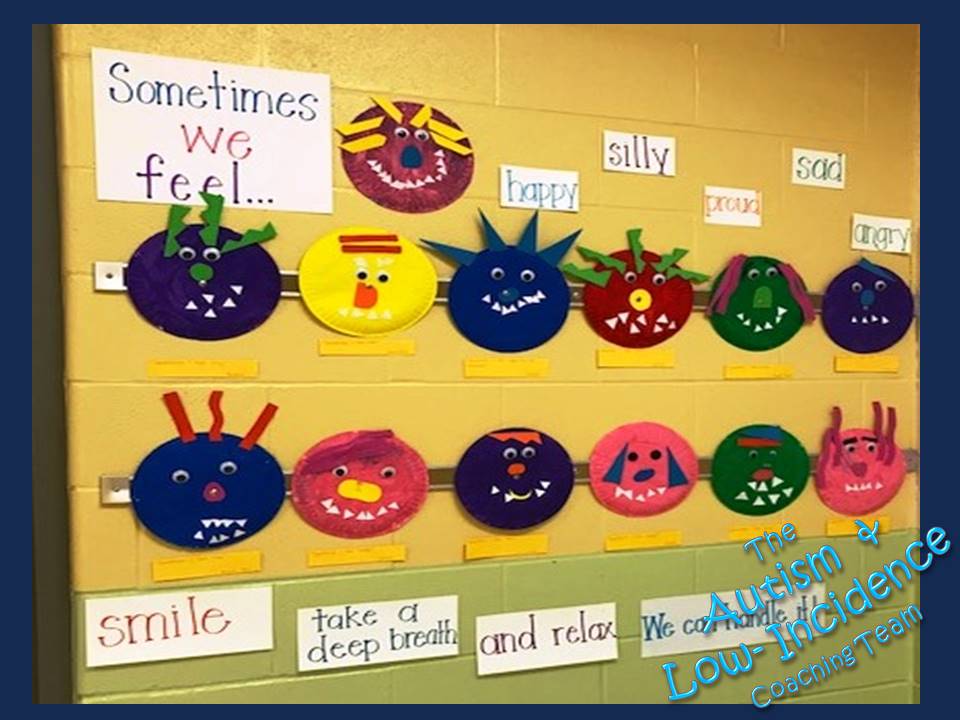
Emotions Art ProjectsAngela Shelton
Rosa Parks ELC, Dayton